Showing posts with label facebook. Show all posts

Monday, January 30, 2012

Phone Stacking :: Empilhem seus celulares!

Post copiado fielmente do blog do Rodrigo :)


Você conhece o phone stacking? É uma nova moda nos EUA que funciona como uma espécie de jogo entre todos que estão sentados na mesma mesa, que funciona da seguinte forma:

  1. No início da refeição, todos colocam o telefone com a tela virada para baixo no centro da mesa – um telefone em cima do outro.
  2. Os push notifications, mensagens e alertas continuarão bipando normalmente ali na pilha de telefones.
  3. O primeiro que não resistir e pegar o telefone para conferir, perde o jogo e paga a conta.

Se ninguém pegar o aparelho para checar as mensagens ou ligações, todos são considerados vencedores e dividem a conta normalmente.

A brincadeira começou em alguns tumblrs, e agora está ganhando adeptos em vários lugares do mundo, e pode ser uma ótima ideia para levar para a família e amigos!! Gostei da ideia e pretendo colocar em prática nos próximos encontros com os amigos, nem que seja depois de fazer o checkin no Foursquare!! ;-)

Via UoD.

Eu SUPER APOIO esse jogo!

Turn Your Facebook Timeline Into a Movie


A browser tool launched Monday transforms content from your Facebook Timeline into a fast-paced movie.

In what will surely incite a roller coaster of flashbacks, Timeline Movie Maker from marketing agency Definition 6 lets you become a filmmaker with the click of a button. Definition 6 collaborated with Facebook.

After Movie Maker “parses nostalgia,” “captures your good side,” and “finds I-Remember-Whens” on your Timeline, the tool allows you to change the movie’s music and replace any image, video or check-in.

Watch my reel below for an example (without the sound). Click here to create your own one-minute cinematic experience. You’ll be able to share your movie only to Facebook friends — not to subscribers. A spokesperson told Mashable Definition 6 has no plans to make the videos embeddable.


I used Screenr to record my mini movie, although the music didn’t capture (trust me, the music is stellar and is a dynamic addition to the visuals). You’ll have these options for music when you create your movie.


“Timeline Movie Maker is evaluating highly engaged content in a chronological fashion, choreographing a user’s personal journey on Facebook, with content that has the most engagement and uses comment analysis to identify key life moments and where the user is tagged,” says Paul Hernacki, CTO at Definition 6. “The result is a powerful example of how the synergy between technology and marketing is crucial in driving complex projects like this to life, ultimately evoking an emotional connection from the end user.”


SEE ALSO: 28 Essential Facebook Timeline Resources | How to Get Old Facebook Back


Facebook announced Jan. 24 that old profiles would be swapped out for Facebook Timeline within a weeks.

What do you think of Facebook Movie Maker? Sound off in the comments.

Tuesday, July 26, 2011

How Much Time Do You Spend On Facebook? This Browser Plug-in Knows All


How many hours did you lose to social media last week? Is online gaming or ESPN dampening your productivity? A new service makes answering this kind of question much easier by tracking your browsing habits the same way sites like Mint.com track your finances.

Voyurl‘s private beta version was a recommendation engine based on friends’ and the general community’s online activity, as collected by a plugin they installed. When you added a friend, you could see what new sites he or she was visiting. You could also see what sites the community visited most often.

Two other companies are making products that share browsing data, but it still isn’t widely accepted. Voyurl founder Adam Leibsohn says the service has a tendency to “freak people out” and was difficult to use effectively. Even so, beta users logged 4 million URLs using the product.

The new version of Voyurl still relies on clickstream data gathered with a similar plugin, but keeps the pages you visit completely private. Instead, it uses the data to make recommendations without asking for active feedback — no stars, no ratings, no thumbs up or down.

A curated list of recommendations is created based on what sites you visit and how you behave on them. Factors like scrolling and mouse hovering are taken into account to decide what you like.

Users who install the Voyurl plugin also get a detailed description of how they use the web, including how much time they spend browsing, the sites they spend the most time on and their browsing patterns. You can also compare your behavior to the average user.

“You’re looking at yourself in a mirror you didn’t know existed,” says Leibsohn, who used rent money to finance the startup while he found accommodation on couchsurfing.org for a year. “You say, oh, I didn’t know I spent that much time on Facebook.”

Voyurl is still in private beta, but Mashable readers can try it out by following this link.


Image courtesy of istockphoto, photosipsak

Want To See Who Is Viewing Your Facebook Profile?


The Spark of Genius Series highlights a unique feature of startups and is made possible by Microsoft BizSpark. If you would like to have your startup considered for inclusion, please see the details here.

Name: WhoIsLive

Quick Pitch: WhoIsLive lets you see who is viewing the same webpage as you and start conversations with them.

Genius Idea: Making every web page instantly social, with or without the participation of its publisher


What if every web page you visited became an instant chat room? Startup WhoIsLive is launching a browser plugin Tuesday that could become one way to find out.

The Internet Explorer and Firefox plugin creates a browser sidebar that shows you other users who are looking at the same web page. Using the sidebar, you can set a status message that everyone else on the page can see, or you can chat with people individually.

Theoretically, the tool can show you who is viewing your Facebook profile, allow you to ask for guidance from other shoppers on an ecommerce site or be used as a real-time discussion tool on blogs and news sites. The websites’ publishers don’t need to install anything for the plugin chat room to work on their sites.

But there is one rather huge caveat: Users can only see each other, not web browsers who haven’t installed the plugin — which means that a critical mass of users needs to be reached before the tool is useful. And before you can see who is viewing your Facebook profile, you’ll need to make yourself visible to people who might be monitoring their profiles with the same tool.

“It’s like anything else that is related to social,” explains co-founder Elad Natanson. “It’s a give and take. ”


The idea behind WhoIsLive is a great one. Companies like Marginize have long been aiming to build a social layer on the web that is based on what you care about instead of who you know, and enabling people on the same page to connect is a smart way to do it. If the tool gains widespread adoption, then Natanson’s prediction that WhoIsLive will “change the way that people use the Internet” isn’t unreasonable.

Getting to that critical mass, however, is the startup’s biggest hurdle. If it pulls it off, Natanson says WhoIsLive will sell a premium product to site owners that designates them as such in the chat list. Many services like WebsiteAlive and Livezilla offer similar live-chat customer service tools, but site visitors can only chat with the site owner. The premium product would also offer site owners personalized analytics.

“You always see the numbers,” Natanson says. “But in this case you can actually see who your visitors are … You can connect with them.”

Photo courtesy of istockphoto, ChristopherBernard


Series Supported by Microsoft BizSpark


Microsoft BizSpark


The Spark of Genius Series highlights a unique feature of startups and is made possible by Microsoft BizSpark, a startup program that gives you three-year access to the latest Microsoft development tools, as well as connecting you to a nationwide network of investors and incubators. There are no upfront costs, so if your business is privately owned, less than three years old, and generates less than U.S.$1 million in annual revenue, you can sign up today.

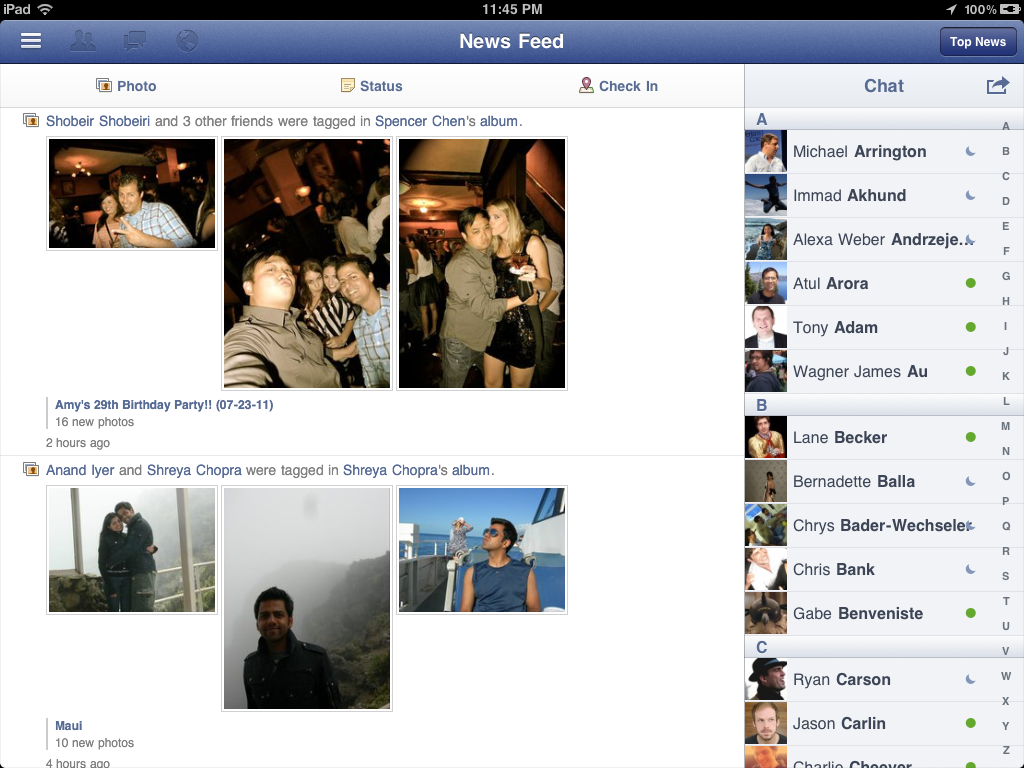
Facebook readies an official iPad app


Facebook iPad app image chat status

After downplaying the importance of having an iPad app, images of Facebook’s upcoming iPad app have finally been exposed via TechCrunch. The HTML5-rich app looks nearly complete and could to be ready to launch shortly.

For iPad users, this new application promises to be a far easier way to enjoy the social network in lieu of using the full Facebook website. Unlike the Facebook’s iPhone app, the design of the iPad app features a left-side menu system and extensive use of overlay menus, which are commonly found in other apps for Apple’s popular tablet.

News of the iPad app’s existence is nothing new, but Facebook finally seems to be on the verge of releasing it to the public. The timing of the release couldn’t be better either. Already, 250 million Facebook users actively access the service on a mobile device. As the network approaches 700 million users worldwide, a new app could be a major source of growth for Facebook.

There has been no word of an official launch date just yet. However, judging from how polished and detailed the app looks, we won’t have to wait much longer.

Facebook iPad app image

Monday, July 11, 2011

AT&T now selling the HTC Status: The 1st phone with a Facebook share button

Screen shot 2011-07-11 at 4.00.38 PM
AT&T announced today that it is now taking pre-orders for the HTC Status, the first phone with a dedicated Facebook share button. The phone is exclusive to AT&T customers for $49.99 with a two-year contract and will be in stores on July 17th for $49.99.

AT&T is touting the HTC Status as the first phone to feature a dedicated Facebook share button as opposed to a phone that links to the mobile Facebook application. The HTC Status also encourages status updates by lighting up when there is an activity to share, such as a song you are listening to, a website you are viewing or a photo you’ve just snapped. To the average human being with a day job, this sounds pretty annoying. But the phone is specifically aimed at Facebook loving students and is available just in time for the back-to-school season.

“We can’t wait to put the HTC Status in the hands of our young customers who will waste no time tapping into Facebook to update their friends,” said Jeff Bradley, senior vice president, Devices, AT&T Mobility and Consumer Markets in the press release. “We’re also really pleased to offer the hottest new smartphone at an affordable price to this important, socially savvy youth market.”


The Facebook share button will allow you to:

  • Post instantly on your own wall or a friend’s wall.
  • Take a picture or shoot a video and share it instantly. You can even post multiple pictures at one time and label and tag them before posting. Or even post photos automatically as you’re taking them.
  • Check in to Facebook Places.
  • Share the music you’re listening to including the song title.

According to AT&T, the HTC Status runs on the Android 2.3.3 Gingerbread platform, which is its first smartphone to do so. It might be the most Facebooky phone ever as Facebook content and information is integrated in the phone’s clock, dialer, calendar, address book and photo gallery. The HTC Status also features an one-touch Facebook chat application that lets you maintain your chat conversations, even when you navigate away to take a call, browse the Web or play a game, which provides more power to Facebook chat, giving users even less reason to continue with traditional SMS.

The HTC Status includes 5-megapixel camera with auto-focus and LED flash, a physical keyboard, a 2.6-inch touch screen with 480 x 320 resolution and capacitive navigation buttons.

We’ll have a full review of the phone for you soon. Presales begin today here.

Tuesday, July 5, 2011

Facebook Blocks Friend Exporter Plugin


Facebook is actively trying to block Facebook Friend Exporter, a Google Chrome extension that lets you export the list and contact info of your Facebook friends for use in other services, the extension developer Mohamed Mansour claims.
“Facebook is trying so hard to not allow you to export your friends. They started to remove emails of your friends from your profile by today July 5th 2011. (The extension) will no longer work for many people”, Mansour wrote on the extension’s homepage.
The Facebook Friend Exporter is a simple tool that lets you grab phone numbers, e-mails and other data from your Facebook friends, and directly import them into Google Contacts. The current version doesn’t work anymore, but the author promises to build and maintain new version that uses a different design.
CNET, however, notes that the tool is probably against Facebook’s Terms of Service, which states: “you will not collect users’ content or information, or otherwise access Facebook, using automated means (such as harvesting bots, robots, spiders, or scrapers) without our permission.”
Google, an online giant but a heavy underdog in the social networking race, has taken the opposite stance, having recently launched Takeout, a tool that lets you export all your data from various Google services.
A Facebook spokesperson did not immediately respond to our request for comment.
[via CNET]

Friday, July 1, 2011

Facebook To Unveil Skype-Powered Video Chat Next Week [CONFIR


Facebook’s “awesome” announcement next week has been spoiled. The social network will reportedly be unveiling a Skype-powered video chat platform.
Facebook’s Seattle team was behind the new feature, according to TechCrunch. Skype and Facebook already have a serious partnership that integrated Facebook social data directly into the Skype client. Now it looks like Skype will be coming to Facebook.
This isn’t even the first time we’ve heard about Skype-powered video chat on Facebook. Rumors surfaced last year about such a product, but it never materialized.
The report is sparse on details about how it will work. Will it require a software download? Will it support group video chats? Undoubtedly it will be a major addition to the Facebook platform. Google+, the search giant’s answer to Facebook, launched with a group video chat feature, Google+ Hangouts. Google is seeing a lot of traction with the feature, but if Facebook can release a video chat product next week, Google+ Hangouts may not seem as revolutionary.
We’ve reached out to Facebook and Skype for comment.
Update: While Facebook and Skype aren’t saying anything officially, our sources confirm that Skype-powered video chat on Facebook will indeed be launching next week.

Tuesday, June 28, 2011

The 5-Minute Facebook Page Makeover


Over time, a Facebook Page can get stuck in the past and need some revamping to reflect the newest upgrades to Facebook’s layout. Many changes are quietly rolled out and go unnoticed by page admins. Few people keep up with Facebook’s constant evolution in addition to managing the day-to-day activity on the Page.

.

In my last post, I discussed ideas for improving the Facebook photo strip and explained how this often-ignored feature can completely transform a page’s design. The Blueglass Facebook Page needed a minor facelift, so in addition to updating our photo strip, I also tweaked a few other design elements on the page. This post walks through the quick changes I made, resulting in a more attractive page that optimizes visual branding.


Pick Featured Likes


This was the most obvious fix to the page: we weren’t sharing the love! Liking other Pages gives exposure to a company’s other brands, partners, or spokespersons. Only pages that are “Liked” by a page can be tagged in posts. Additionally, five pages can be selected to always appear as Featured Likes. This is a great way for parent companies to highlight their product pages.


Featured Likes should make sense and add visual interest. From L to R: Amazon, Dell, Miami Heat

1. In the Page settings, click the “Featured” menu.

2. Click Edit Featured Likes.

3. Select which five pages to feature.


Fix the Thumbnail


The thumbnail version of the profile picture identifies the page everywhere it goes: both within the page, such as next to posts, and around other parts of Facebook, such as in fans’ news feeds. A good thumbnail is recognizable and relevant to the brand.

Because the thumbnail image is a square, the profile picture should be square or contain a square area that can be selected as the thumbnail. For Blueglass’s makeover, I cropped the photo to make it more square, then increased the size so it better aligns with the photo strip.

1. In the page settings, click on the Profile Picture menu.

2. Edit Thumbnail.

3. Drag the photo to select the portion of the profile image you want as the thumbnail or select “scale to fit” to use the entire image.


Gap regularly changes its profile picture to feature new products, yet the thumbnail remains consistent.


By putting the iconic logo somewhere in every profile picture, it can always be selected as the thumbnail. The most this has deviated from the standard logo was during the holidays when they used a red logo.


Gap's current and past profile pictures contain the logo used as the thumbnail

Cull the Tabs


The Tab Navigation section reveals 6 tabs – not including the Wall and Info – before the cut. Many pages usually have a handful of Tabs which either no longer work or provide no value to fans. This can be frustrating for fans who have come to a page to find specific information.

This was the easiest part of the makeover, since I simply removed some of our tabs and put them in a different order.

1. To edit the Tabs, click on the “More” option and then Edit.

2. X out any Tabs you want to remove. This will not delete the tabs and their content. Tabs can be restored through the apps menu in the page settings.

3. Rearrange Tabs by dragging into the desired order.


To really make the Tab Navigation branded, custom icons can be added to Tabs made with third party apps. Either a logo or simple stock icons relating to a Tab’s content can be uploaded to appear next to Tab descriptions.


From L to R: State Farm, Walt Disney World, Chick Fil A

Did your Page need any of these updates? Have you noticed any recent Facebook changes most Pages haven’t implemented yet?

– — – — – — – –

Tuesday, June 21, 2011

5 tips to improve your Facebook ad campaign

3476940249_bed4dd20e3_b
Given that we cover a lot of news on Facebook’s ad product developments, I thought I’d provide some tips on how to run an effective ad campaign and how to get the best return on your advertising spend. Optimising your ad campaign once it’s been set up is incredibly important and is often something advertisers overlook, as it’s tempting to throw a couple of ads up there and let them do the work for you. This will only get you half the real results of an effective ad campaign however.

1. Analyse your Edgerank


Edgerank is the formula by which Facebook determines the likelihood of your updates to appear in someone’s ‘Top News’ section on their newsfeed. While some people choose to access content via latest news, which means they see latest updates as they come in, the majority choose to access content via their Top News feed. This is where Edgerank comes in, as Facebook selects the stories that appear in here based on what it deems to be the connections you’re most interested in – i.e. Pages, groups or people that you interact with most. If you’re investing in ads but not running an engaging Page, you could have a low Edgerank score, which means you’re paying for the fans at one end, but they’re not actually seeing your updates at the other end – the free part where you get to continually engage with your fans. You should use this free Edgerank checker to measure the score of your Page and work to continually improve this. Look for engaging updates, the days of the week when fans are engaging with you most for example, and tailor your activity off the back of this.

For everything you need to know about Facebook’s EdgeRank, read here.

2. Avoid ad saturation


With the new ad report tool, you’re able to see how many times the average person has seen your ad. This is shown in the ad report under ‘frequency’. If you have a larger ad budget, or you’re targeting a very specific audience, the chances are the same people are going to see your ad again and again. So while you might think you’re continually targeting the right people for your ad spend, you could actually just continually targeting the same people with the same message, and they could actually start to get annoyed by your brand if they see it popping up all the time in their newsfeed. You can try and avoid this by regularly changing the text and image of your ad, if you are targeting the same people all the time, so that it appears fresh and you might eventually convert them into a click. It might also be time to review your campaign if you’re continually gaining impressions for the same people, but not generating clicks. A new tactic might be required, such as changing the target audience completely.


3. Just change one thing


When running an ad campaign on Facebook, it’s advisable to run different ads within the same campaign, so you can effectively optimise it after and see what’s working. We would generally recommend around 10 ads for each campaign, though this can vary of course if you have a particularly large budget. To get an effective view of how they’re performing, try just changing one thing between each ad. Whether it’s the ad copy, image, or target audience, if you change just one thing then you can see what the difference is when it comes to reviewing which ad is performing better. You could find that just changing the image in the ad doubles the click through rate. If this is the only difference between one ad and another that’s performing poorly, you know that image works and you can then roll it out for other ads. When making changes as well, try to leave them for a minimum of 7 days if you’re running a longer campaign, so you build up enough data to analyze for the ad, and you know it’s a fair test as you’ve accounted for all the days of the week, which can affect how an ad performs.

4. Target friends of connections


This is an option that not many people actually know about within Facebook ads. When setting up your campaign you have the option to choose to only show ads to friends of connections. This applies for Page ads, not ads that you’re sending directly to a website. What this means is that the only people that will see your ad, are those that already have at least one friend who is a fan of the Page. And while this works for allowing you to target similar audiences, it also guarantees that every time your ad is shown, it will display the name(s) of friends who Like the Page as well. This makes the ad appear instantly more engaging and the user is more likely to be drawn to it and click. This is incredibly effective and we’ve run ad campaigns before where we only have this option selected, with great success.

5. Go for little and large


While the targeting options available within a Facebook ad campaign allow you to select niche audiences for your product, I recommend running this strategy alongside an ad that targets a much wider audience. If you’re looking to create brand awareness, you can benefit from a lower cost per click for broadly targeted ads, and you can potentially reach new audiences that are relevant for your brand. Of course, the niche ads will bring you traffic that is more likely to convert, but try running a broadly targeted ad to see how this traffic is performing. This should only really be run alongside niche ads (unless you have a significant budget and are on a brand awareness exercise) that target lots of different niche audiences. So don’t just target 25-35 y/o interested in cooking, but try an older age range with the same interests. Don’t forget that with Facebook’s ad report you can see how many of your clicks are actually converting into connections (i.e. Likes), so you can effectively review how this ad is working for you.

Spending too much time on Facebook? Try Keep Me Out, a babysitter for your browser

Screen shot 2011-06-21 at 3.02.45 PM
We are all guilty of Internet induced ADD. And because of addictive sites like Facebook, Twitter, The Next Web as well as apps like StumbleUpon, it’s never been easier to get lost on the Web. Thankfully, having Internet ADD and spending too much time on Facebook and Twitter is a prerequisite for being a technology blogger. “6 windows, 5 tabs, 5 columns in TweetDeck and a phone call. All before 9am,” says our very own @BradMcCarty of his Tuesday morning.

But for those of you who have real jobs with bosses that strongly discourage you from logging hours on Facebook and The Twitters, then you will appreciate this new app “Keep Me Out“. Simply make a bookmark for the website with Keep Me Out and store it in your browser. Using the bookmark will prevent you from visiting the website too often.

“I don’t need that I’ve got the self-discipline of a… HEY LOOK VIDEO GAMES.”

- @JFalconer

The most popular bookmarks are facebook.com, youtube.com, hyves.nl, twitter.com, orkut.com, google.com, myspace.com, vkontakte.ru, tumblr.com and gmail.com. Set up is easy, simply visit the site and set your your preferences. Browsing behavior control in an app, voilá!

Monday, June 20, 2011

Nike’s smart Facebook campaign makes running fun again

Screen shot 2011-06-18 at 3.30.28 PM
When Nike did its market research in Amsterdam it found that people thought that running was boring with the youth market especially disenchanted. So being the genius marketers that they are Nike decided to launch an innovative online to offline campaign that used Facebook as the main mechanic. The idea was to create a movement of runners who had to paint their city using the running routes as their artwork.
The campaign went even further and Nike created running clubs where people could come together who had met online for entertainment, food, drinks and a community spirit. The users started engaging with each other offline and online and a real sense of community was built up between the runners as they all started to join up and follow each others routes that had been created on Facebook. It’s a stunning campaign that obviously worked well for Nike because building community online or offline is tough but matching the two up to create a real running movement has to be admired. Who said running was boring?

iPhone App Turns People You Meet in Person Into Facebook Friends


A new mobile app startup hopes to help you connect with people nearby on Facebook — by cutting down on the friction of the friend request.
The startup, Friendthem, has just released its free iPhone app [iTunes Link] that is designed to let people see the Facebook users around them and then send a friend request immediately, or file the request away for later.
In other words, it’s easy to friend someone at a meeting or a party — or to pretend that you’ll do so later.
We spoke with Friendthem founder Richard Passer about the app and why he believes that the friend request deserves to be “elevated to its proper status as the gateway to all social networking connections.”
Whether you meet someone at a bar, in the park or at a conference, friending that person on Facebook or following them on Twitter or Foursquare is now a common social norm. But the process of actually finding and sending a friend request can be complicated, thanks to the sheer number of people on Facebook. Searching for a common name like “Jason Smith” can yield dozens of results. If a users hasn’t shared their photos with non-friends, or updated their location recently, tracking that person down can be difficult.
So people who want to connect on Facebook can use Friendthem as kind of a hybrid meeting place. You get to control what information about yourself is shared with others. You choose whether your name or photo is displayed. You can decide to show off your hometown, or not.
Other users that have Friendthem installed and are close by can then see you in the app, and choose to initiate a friend request now or later.
This video shows the app in action:


The app doesn’t require any sign-up — simply login using Facebook and then choose what information you want to make visible. For users that don’t want to be listed in certain areas — like at the office or on vacation — Friendthem lets users create geo-fences, or areas where they will be hidden from the app.
Friendthem is different from apps like Hashable or Bump because the focus is on building relationships within Facebook. If you share any mutual friends with someone nearby, Friendthem will let you know.
Still, will users download and install yet another social app? Passer was optimistic on this point. He believes that the utility of Friendthem will outweigh the hassle of another download. We’re not convinced that’s true, but the fact that three users were found within our city block while testing the app — which has had zero publicity so far — could prove him right.


The app is out for iPhone now and an Android version will be released in the next few weeks. A Windows Phone app is also in the works.
In the future, Passer will also look at developing apps that connect users to other Twitter or Foursquare followers. For now, however, his focus is on Facebook.
In an ideal world, Facebook would open up its mobile API in such a way that users could opt to use Friendthem from a standard Facebook app, and then just by having Facebook for iPhone or Android installed, Friendthem users could send requests.
For now, however, it’s an idea with promise. The “Friendthem Later” feature is particularly nice because it tags the location where the person was located with the request — great for those nights when you can’t remember who you met or where.
Sending a friend request in the app takes place using the standard Facebook mobile API. Users still have to send a message and confirm the request, so accidentally sending friend requests shouldn’t be a problem.
If Friendthem can gain a critical mass of users, we could see this being an app we would use every day.
What do you think about using location-aware technology to help aid in friend requests? Let us know in the comments."

New app lets you Facebook at work in an Excel spreadsheet

Image530
People using Facebook in work is a huge problem for employers and some go as far as banning it completely for all their employees in a fruitless bid to increase productivity. Well a new app from Diesel is seeking to solve that problem and allow you to access Facebook all day long without anybody being the wiser that you are social networking instead of working on tiresome documents.
The app hooks up to your Facebook account using Facebook connect and you can start updating your status, liking content and chatting with your friends all from what looks like an excel spreadsheet to the outside world. Their campaign is all about making work more fun and although employers are not going to like this you have to take your hat off to Diesel for coming up with a great concept that is sure to get some serious buzz online in the coming days. Excel spreadsheets have never been this fun. Introducing Excelbook…

Connect Your Account

This is essentially a desktop app so the first thing you will have to do is head over to the site and download it for either PC or Mac. Once it launches the app will prompt you to log in with your Facebook account and ask you to pull information from your account.


Update Status And Interact With Friends

Once you have logged into the app it looks to all intents and purposes that you are using an excel spreadsheet and carrying out serious work. All your Facebook status updates and messages from your friends display within the columns and you can even flick between the wall, chat and the news feed. It’s not the full Facebook experience but you can always click on the links which will open up in a new window and you can do simple things like update your status and reply to friends from within the spreadsheet.

Genius Marketing

All of this is carried out by Diesel in a bid to make work more fun and you can see the campaign site here. It’s a cool little app that will get people talking and some people might use it but it’s more about making a bit of noise around the launch of the campaign and for the relatively small cost of developing a simple app it is something that will get massive coverage because of it’s connections to Facebook. Hats off to Diesel on this one.

Tuesday, June 14, 2011

Facebook Collaborates With Social Browser RockMelt

Original: Facebook Collaborates With Social Browser RockMelt
 

Facebook has collaborated with RockMelt on a new version of the socially savvy web browser.
The browser, which is available for download Tuesday, includes more customizable Facebook chat integration and a built-in manager for friend requests, messages and notifications.
Facebook has also made a slight change to its site. When RockMelt users are on Facebook.com, friend requests, messages, notifications and chats will show up directly in RockMelt instead of on Facebook itself. When a user initiates a Facebook chat while on Facebook.com, it will open a RockMelt chat window.
“We give people a way to share and communicate with their friends wherever they are,” Eric Vishria, RockMelt’s co-founder and CEO, told The New York Times. “Over time, you will see a lot of product innovation come out of the partnership with Facebook.”
But product innovation, the Times points out, is not what RockMelt needs the most. The browser has only a minuscule percentage of marketshare. Could the world’s largest social network help with that?
Ethan Beard, director of platform partnerships for Facebook, said there are no plans for helping RockMelt’s distribution.
“We’re committed to working with startups like RockMelt that are transforming their industries by designing products to be social from day one,” he said in a statement.