Showing posts with label App Store. Show all posts

Thursday, September 15, 2011

Daily iPhone App: WordFoto


WordFoto is a photo app that will assemble a picture for you using both a source picture and any words you happen to throw in the text field. Basically, you put a picture and some words into the app, and the app's crazy algorithm spits out a picture assembled out of different variations of the two or three words you punched in. It's an interesting mix of images -- a little simple, honestly, since all of the pictures look about the same. But if you need a really interesting illustration or have a really great picture/word match, you can make some graphics that can be pretty striking.


The app itself is US$1.99 on the App Store right now, and it's got a ton of nice features, including custom styles for your photos in addition to the standard presets, the ability to crop and save your outputted photos, and of course you can share them out on email or Facebook as well.


The app's being updated as well, with new styles and features all the time. WordFoto is a fun way to make some interesting art. It's a little simple, but used in a subtle and careful way, it can make some really powerful graphics for you.

Tuesday, September 6, 2011

Transfer hundreds of photos to Google+ in minutes with Google Plus Photo Importer for iPhone

If you want a quick an easy way to import photos from your various online photo sharing sites straight into Google+, in a matter of minutes, the brand new iPhone app, Google Plus Photo Importer is probably one of the easiest ways to do this, especially when you’re on the go.
Purchasing Google Plus Photo Importer, a $0.99 iPhone app available in the iTunes App Store, allows you to instantly upload images from Facebook, Flickr, Instagram and Photobucket.


The way the app works is pretty flexible. You can select individual photos, select certain photos within a set or album, or even select an entire set or album at a time to upload. The app retains all of your information as well, including set titles, image titles and even metadata, so the transfer is a painless and easy process requiring no effort on your part.


Google Plus Photo Importer boasts the ability to transfer 100 photos in less than a minute, so we put the app to the test. A transfer from Flickr to Google+ clocked in at about a minute and a half, which is still pretty impressive.
What’s even more impressive is that Google Plus Photo Importer will not affect your bandwidth or data usage since the transfers are all cloud based – there’s no download to your phone so you can easily import photos when you’re on the go.
There’s a great photography community on Google+ that is continuing to grow, and we’ve already looked at exactly how you can put Google+ to use as a photographer, so if you want to get all of your photos into the social network to share with your followers and friends, this is the easiest way to do just that.
If you don’t have an iOS device, be sure to check out The Mother of All Google+ Resource Lists, which features a few other ways to import your photos into Google+.

Tuesday, August 30, 2011

New “Grey’s Anatomy” TV Ads Get Shazamable


When ABC starts running promos Monday night for season eight of the hit drama Grey’s Anatomy, fans can unlock extra content with the Shazam smartphone apps.

In the past few months, Shazam has ramped up its Shazam for TV initiative — it could be considered an aural QR code.

Using the Shazam apps for iOS, Android, BlackBerry, Symbian and Windows Phone 7, users can not only tag and identify audio tracks or radio playing in the background, but unlock special messages or features from TV ads. Last week, Shazam and Vevo teamed up to make Lil Wayne’s latest video “Shazamable” too.

For Grey’s Anatomy, promos for the upcoming eighth season can be tagged using the app. Once tagged, fans will be given a sneak peek at the drama series.

Additionally, more content will be unlocked in the next few weeks, including a music video by Scars on 45, as well as other scenes from the show.

It’s a cool concept. We like that fans are rewarded for going the extra mile. It’s also a smart pivot for the startup, especially now that the music identification space has more players.

Grey’s Anatomy premieres on Sept. 22. The Shazamable promo spots will start airing tonight in prime time on ABC.

Thursday, August 18, 2011

PocketGuide partners with hip, global travel group for Latin American expansion

machu-picchu-peru
The last few weeks of summer are upon us! In case you missed our post at the start of the season, read up about how summer sparks creativity. Take moments to enjoy the natural world around you; find action in relaxation and you’ll find the necessary inspiration for innovation. Most importantly, travel!

Put down the heavy city guidebook and your mediocre map, PocketGuide , a new travel application from GPS City Guide, Hungary-based start-up, covers all this and even has voice instructions. The app runs on GPS positioning and will tell you interesting stories and relevant information as you travel throughout a city- just like a personal tour guide. And best of all, once the app is downloaded, you don’t need a WiFi internet connection to use it. PocketGuide also enables users to make stunning 3D travel videos – merging Google Earth map, personal photos, videos and the user’s voice recordings and then share the videos via email or Facebook. As of August 2011, PocketGuide covers the top 20 European destinations featuring 10 different trails and 500 attractions.

Watch the video here for a full demo:


Pocket Guide

To expand into the Latin America market, PocketGuide has just finalized a strategic partnership with Washington, DC-based Croft Global Travel. Founder Ryan Croft was appointed Director of Latin America and will oversee the launch of all future Latin America destinations, starting with the most popular cities in South America. “We’re excited to join the PocketGuide team,” says Croft. “The PocketGuide app’s technology represents the future of connected international travel.” Croft also runs a daily deals company aimed at tech savvy travelers called CityCiao, which we covered this spring.


Pocket Guide from Pocketguide on Vimeo.
PocketGuide is available for iOS, Android and Symbian based mobiles. Download here.

Also read: 10 Must-Have Travel Apps for your iOS device and Best of 2010: Travel Apps for the iPhone

Wednesday, August 17, 2011

Déjà Vu – Your Visual Memory


It looks as the Déjà Vu is the app I was missing in my life! I keep using my iPhone camera as a memory device, snapping photos of business cards, wine labels, books, products I want to buy etc. But I usually end up having a hard time finding them again in my overflowing photo album.

This is where Déjà Vu comes in. The app helps you remember things visually. Use the iPhone app to snap visual memos on the go. A simple interface and image recognition support you in organizing your visual memos. I am definitely giving this a try!

dejavuapp.com

(thank you Marc)

Friday, August 5, 2011

Rdio for iPad Has Arrived [PICS]


We heard that it was on its way to an iOS device near you, and now Rdio for iPad has finally arrived.

Social music subscription service Rdio is already available on a bevy of devices and mobile platforms, and now the tablet version [iTunes link] has landed in the iTunes store with all the same features as the iPhone iteration.

Rdio for iPad allows you to follow friends and influencers and check out their collections, search through its 10 million songs, sync music for offline listening, build playlists and more. However, when the app is blown up to iPad proportions, it becomes a delight to use. Scrolling through album art and playlists is more of a leanback exploration of music compared to the iPhone version.

As with the iPhone app, the iPad version is free to download, but you can’t access any music without paying the subscription fee. Usually, Rdio Unlimited (which is required to listen to music on mobile and consumer electronics devices) costs $9.99 per month. However, due to the 30% surcharge that Apple charges developers for new subscribers, Rdio will cost $14.99 if you purchase it in-app.

In order to avoid the extra charge, Rdio suggests signing up for the seven-day free trial at Rdio.com and then subscribing to Unlimited via the website when the trial expires.

For a look at the goods, check out our hands-on gallery below.


Follow Friends


See what your friends are listening to, as well as the rest of Rdio.


Offline Syncing


Sync music to your iPad to listen to even when you're offline -- like on the subway.


User Profiles


Get all the info about friends and influencers by clicking on their names.


Recommendations


Rdio serves up recs based on your listening history. Click on an album to listen and/or add to your collection.


Collection


Scroll through all your music.


Album Art


Pull up album art while listening for the eye candy factor.


Artist Radio


Listen to artist radio to find new tunes.


History


Click back to songs you listened to a few days ago.


Playlisting


Create playlists and collaborate with your friends.


Subscribe To Playlists


Like a friend's playlist? Add it to your collection.


New Releases


Scroll through new music to add it to your collection.

Image courtesy of Flickr, Carnoodles

Tuesday, July 26, 2011

Flipboard is a real digital magazine now — it comes with ads


Flipboard was one of the first iPad apps to really take advantage of the touch-and-swipe interface of the device to create a kind of digital magazine, made up of users’ Twitter feeds and Facebook streams, combined with RSS feeds and curated content from traditional media outlets. Now the startup is making a move into the advertising side of the digital-media equation, by launching a partnership with traditional publishers like Conde Nast to push their ads into the Flipboard app. Can the company succeed at digital advertising when other players have failed?

For the most part, traditional media companies like Conde Nast have tried to take advantage of the iPad via content-specific apps, many of which have been criticized (by us, among others) for being non-web native “walled garden” experiences that are boring and don’t add much value to the printed product. At the same time, however, some startups including Flipboard have tried to build apps that act like digital magazine-stands, with content from many different entities — something that we’ve argued is a much more digital approach than a standalone app for every media outlet.

In addition to Flipboard, there is a Vancouver-based startup called Zite — which drew the ire of the traditional industry by “scraping” content from RSS feeds while removing advertising, and was hit with a cease-and-desist order from a number of media players — as well as News.me, which was created by programmers at the New York Times and is now part of the Betaworks incubator, and others such as News360.

But while many of these apps have been focused on aggregating content, not many have made the leap into advertising. Flipboard’s new program will see selected brands that have a relationship with Conde Nast appear in full-page ads embedded in the streams of the publisher’s content, beginning with American Express in The New Yorker, followed by Lexus in Bon Appetit magazine and Wired. Flipboard also suggested that this was just the beginning of a much larger advertising rollout — CEO Mike McCue noted that the company has more than 30 media partners.


Flipboard’s partnership with Conde Nast also suggests that some publishers — who had previously placed all their bets on dedicated iPad apps — are looking for alternative sources of revenue, and that some may have stepped up that search given some of Apple’s restrictions on what publishers can do via their apps, such as the requirement that publishers who offer a link from their app to a website where they sell their content must also provide in-app sales (for which Apple takes a 30-percent fee).

How users respond to the addition of advertising to their Flipboard streams remains to be seen, but McCue says he isn’t concerned about a negative reaction, and that the company doesn’t plan to offer a paid version that comes without ads. Readers are accustomed to advertising in their magazines, he said, and Flipboard plans to maintain what it sees as a high-quality experience, with full-page ads only. Although McCue didn’t mention it, there also seems to be an opportunity to apply Flipboard’s social-sharing tools to ads as well, or at least to see which get clicked on and provide those analytics to publishers.

Flipboard isn’t the only iPad-based startup that is trying to build a new kind of content-based advertising business outside of Apple’s direct control: OnSwipe, which helps publishers produce iPad-friendly websites that look and function more like apps thanks to HTML5, says that it also plans to try and apply those same principles to making advertising look better on the device as well. While the tablet-based content game started with content, it looks like advertising could well be the next frontier.

The 5 best third-party apps with Lion full-screen support

Want some great Mac apps that work with Lion’s new full-screen mode and really show off why the new feature is one of the best new additions to OS X? We’ve got you covered. Each of the following apps has been updated to include the telltale little icon of two diverging arrows that indicates full-screen support, and each works very well when in that mode.

1. Reeder


Most of us likely do a lot of reading on our Macs. Reeder for Mac is a great way to make that reading even more of a pleasure. The RSS app ties into your Google Reader account, and syncs read and unread status Google and with Reeder for iOS devices. The Mac version was already a lot like the iPad version when it first came out, and with full-screen support in the latest version, it’s even more so. Grab a coffee, but leave the newspaper on the table; Reeder with full-screen active provides a distraction-free environment for catching up with all the latest.

2. Screens


When you need to remotely access your computer, there isn’t always an easy solution, especially when you’re trying to connect from the road. Screens (combined with Screens Connect for hassle-free remote access) is a great way to quickly and easily setup and manage VNC access between Macs. With full-screen support, working on your home computer away from home (or your work computer from home) feels even more like you’re actually working on the target machine, since everything you see is on the remote Mac.

3. Fluid


I noted this update when it arrived, just ahead of Lion’s release, but it’s worth noting again. Fluid provides the ability to turn any website into its own, dedicated Mac app by creating a site-specific browser (SSB). Facebook, Google Docs, and Google Plus are all favorite Fluid apps of mine, and full-screen support means I can keep them even more safely contained away from more productive, work-related apps and content.

4. MarsEdit


If you’re a regular blogger with multiple sites on the go, you’ve probably heard of the Mac standby MarsEdit. It’s a blogging client that’s compatible with most major blogging services, including Blogger and Tumblr, and it’s a native Mac app. MarsEdit’s latest update allows you to compose and edit posts in full-screen mode, which means you can get down to writing in a much more distraction-free environment.

5. Sparrow


Apple’s new Mail app in Lion remedies a lot of the problems many users had with it, and brings some nice new features as well, but that doesn’t mean it’ll feel right for everyone. Alternatives are always appreciated, and none maybe more so than Sparrow, a nice light native email client originally designed for Gmail. Sparrow now works with most other email services as well, and it has a refreshing simplicity that Apple’s own offering can’t match. Plus, now that it has full-screen support, it provides a great environment for catching up on your correspondence in a really focused way.

Those aren’t the only apps with full-screen support, but they are my favorite. What are yours, and which would you like to see get the update that don’t have it yet?

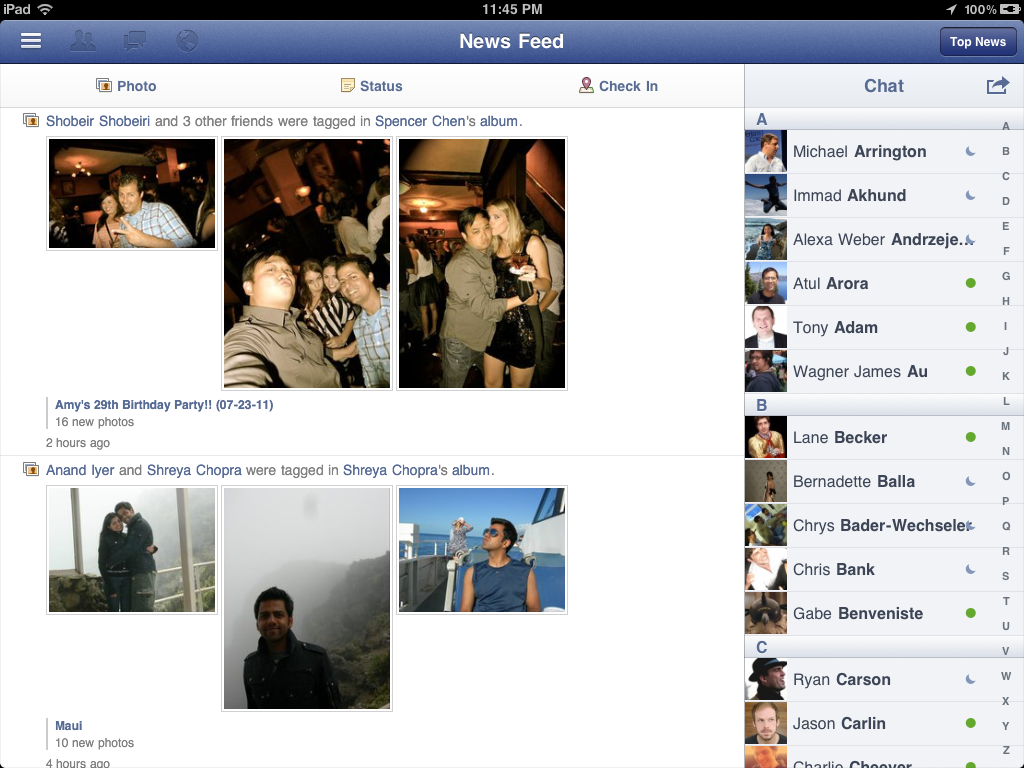
Facebook readies an official iPad app


Facebook iPad app image chat status

After downplaying the importance of having an iPad app, images of Facebook’s upcoming iPad app have finally been exposed via TechCrunch. The HTML5-rich app looks nearly complete and could to be ready to launch shortly.

For iPad users, this new application promises to be a far easier way to enjoy the social network in lieu of using the full Facebook website. Unlike the Facebook’s iPhone app, the design of the iPad app features a left-side menu system and extensive use of overlay menus, which are commonly found in other apps for Apple’s popular tablet.

News of the iPad app’s existence is nothing new, but Facebook finally seems to be on the verge of releasing it to the public. The timing of the release couldn’t be better either. Already, 250 million Facebook users actively access the service on a mobile device. As the network approaches 700 million users worldwide, a new app could be a major source of growth for Facebook.

There has been no word of an official launch date just yet. However, judging from how polished and detailed the app looks, we won’t have to wait much longer.

Facebook iPad app image

Saturday, July 23, 2011

We&Co Aims To Turn the Checkin Into the Thank You


A new startup is hoping to flip the paradigm in location-based mobile apps by focusing not on the checkin, but on the thank you.

We&Co is a new iPhone app that is designed to connect patrons with the people that work at the businesses they visit. The app [iTunes link] is designed to let users give thanks to their favorite service professionals. So when I check in at my favorite neighborhood steampunk bar, I can make sure I give my favorite bar tender Sara, or the owner Anders, a big thank you for being awesome.

In turn, businesses can then reward frequent customers and users with special perks or discounts. Businesses can also opt to give frequent visitors a special “regulars” designation that entitles them to discounts and offers.

As more businesses and service people in your area get thanked, you can browse through the app to find those with the best reputations and the most thanks. You can also see how people you know have rated various employees or service individuals.

We&Co also has features for businesses, including letting them add employees to the system and designate the most-thanked person as “the boss.” Businesses can also choose what to offer “Regulars” as incentives or perks for being frequent guests.


The app is well designed, and the idea of connecting small businesses with their patrons, using the power of location-based networks has a lot of promise. Still, if you wonder how this differs from a service such as Yelp, you aren’t alone.

The biggest differentiator between We&Co and Yelp, or even Foursquare, is that rather than rating a restaurant or stylist, you’re rating the person behind the counter and only highlighting the times you get excellent customer service. We&Co thank yous can be syndicated back to Facebook or Twitter. While it looks like We&Co is using Foursquare’s location API, the app currently doesn’t let you check in using Foursquare. Having that ability would greatly drive utility for the app and also work well with small businesses that already have Foursquare promotions.

What do you think of service-centric location-based apps? Let us know in the comments.

We&Co: These Are The People In Your Neighborhood (Bar, Coffee Shop, Etc.)

Are you friends with your local barkeep, barista, or leather salesman? We&Co is a way to let them know you care. This iPhone app, launched on July 15, allows businesses to register their employees and then visitors can rate those employees (with an emphasis on positive criticism) and add them to your “favorite people” collection. Think of it as Yelp with considerably more granularity.
I suppose the question then is “Why?” Why use an app when you can thank them yourself? Well, presumably, the aggregate score will encourage others to frequent the employee’s place of business, thereby gaining them more tips and potential creepy stalkers. It also puts a name to the faces you see every day at your local eateries, drinkeries, and provisionaries.

Based in Atlanta, Georgia, the small company’s technology is based on work by founder Marc Mathieu’s company, BeDo. You sign in with Twitter, Facebook, or a distinct We&Co account. The app picks up current locations (and employees) and allows you to add locations and employees to various locations. You then select the employee in question and give them a high five or whatever, virtually.

The system allows you to follow your favorite employees (bartenders, for example, or hair dressers) from location to location and employers could choose to reward you for your ratings.


As a misanthrope, I’m slightly unnerved at the idea of actively hunting down and thanking specific employees at a place of business and I would certainly rather thank them with a big tip than a button tap. That said, FSM bless these Southern kids for trying to put inject little kindness into the glum, soulless ritual of buying coffee or tires. I worry that this won’t get used often enough to warrant much of a glowing review, but as it stands the idea is solid and the app works, so high five, We&Co.

Product Page

Wednesday, July 20, 2011

30 Excellent iPad App Interfaces

iPad, often called a revolutionary device, came to the design industry with new possibilities for designers to show off what they can create for this modern gadget. There are no doubts that apps for Apple iPad look beautiful and stunning. Multi-touch and other modern technologies allow users to actually feel the designs. In this post, you will find 30 excellent designed iPad app interface examples. Hope you’ll be inspired by these beautiful apps.

AmpliTube


AmpliTube

HootSuite for Twitter


HootSuite for Twitter

GarageBand


GarageBand

Blackboard Mobile Learn


Blackboard Mobile Learn

Things


Things

Twitterrific


Twitterrific

Awesome Note HD


Awesome Note HD

Keynote


Keynote

Ego


Ego

Djay


djay

Evernote Peek


Evernote Peek

Twittelator


Twittelator

SketchyPad


SketchyPad

BBC News


BBC News

TuneIn Radio Pro


TuneIn Radio Pro

Yap.TV


yap.TV

OmniFocus


OmniFocus

1Password


1Password

Memeo Connect Reader


Memeo Connect Reader

AP News


AP News

Corkulous


Corkulous

iStudiez Pro


iStudiez Pro

Notably


Notably

Taska


Taska

Synth


Synth

Clock Pro HD


Clock Pro HD

Gowalla


Gowalla

PCalc RPN Calculator


PCalc RPN Calculator

CourseNotes


CourseNotes

Audiotorium Notes


Audiotorium Notes